Accessing the Cluster Remotely with Netbird #
To access the cluster from outside of the home network we can deploy the Netbird operator for Kubernetes. Similar to tailscale, this allows us to access all of our services through a private mesh network. The operator handles the creation of network router nodes to create secure Wireguard tunnels to our exposed services.
Prerequisites #
Using the Netbird dashboard, a DNS zone, named “homelab” in this case, must be creted along with a srevice user api key with admin permissions.
Installation #
Helm #
We can use the official Helm chart to install the Netbird Operator:
{
  self,
  inputs,
  ...
}:
{
  flake.modules.nixos.netbird-operator-charts =
    {
      config,
      lib,
      pkgs,
      ...
    }:
    let
      netbirdOperatorChart = {
        name = "kubernetes-operator";
        repo = "https://netbirdio.github.io/helms";
        version = "0.3.1";
        hash = "sha256-MWO1YYzbXxT+OCmjAeGchsp1bl/Dw4D0TQKXHlwIvw0=";
      };
    in
    {
      config = lib.mkIf config.netbird-operator.enable {
        services.k3s.autoDeployCharts = {
          netbird-operator = netbirdOperatorChart // {
            targetNamespace = "netbird";
            createNamespace = true;
          };
        };
      };
    };
}
Preloading the Operator and Router Images #
The images can be preloaded as usual with their corresponding helm values set:
{
  self,
  inputs,
  ...
}:
{
  flake.modules.nixos.netbird-operator-images =
    {
      config,
      lib,
      pkgs,
      ...
    }:
    let
      operatorImage = pkgs.dockerTools.pullImage {
        imageName = "netbirdio/kubernetes-operator";
        imageDigest = "sha256:57740157b4d7c0ce1356f6c1c3cc0f4c6573600eadbee642334b3070fb51899a";
        sha256 = "sha256-bnpB50R8k6POBq+IuZ9UpA0qdw6qhEmIoQXx9EzYrbY=";
        finalImageTag = "0.3.1";
        arch = "amd64";
      };
      routerImage = pkgs.dockerTools.pullImage {
        imageName = "netbirdio/netbird";
        imageDigest = "sha256:b1487a94f432aa706275ebbbbdff3605bf927b056d63855f3d43966cb68c64dc";
        sha256 = "sha256-fMR/IP3PM/fQfYkl+IeoTWkp++oFY9NGu7MP/qb29W8=";
        finalImageTag = "0.70.0-rootless";
        arch = "amd64";
      };
    in
    {
      config = lib.mkIf config.netbird-operator.enable {
        services.k3s = {
          images = [
            operatorImage
            routerImage
          ];
          autoDeployCharts.netbird-operator.values = {
            operator.image = {
              repository = operatorImage.imageName;
              tag = operatorImage.imageTag;
            };
            routingClientImage = "${routerImage.imageName}:${routerImage.imageTag}";
          };
        };
      };
    };
}
Configuring the Network Router #
Using the netbird.io api we can deploy our network routers:
{
  self,
  inputs,
  ...
}:
{
  flake.modules.nixos.netbird-operator-router =
    {
      config,
      lib,
      pkgs,
      ...
    }:
    {
      config = lib.mkIf config.netbird-operator.enable {
        services.k3s.autoDeployCharts.netbird-operator.extraDeploy = [
          {
            apiVersion = "netbird.io/v1alpha1";
            kind = "NetworkRouter";
            metadata = {
              name = "homelab";
              namespace = "netbird";
            };
            spec = {
              dnsZoneRef.name = "homelab";
              workloadOverride = {
                replicas = 1;
                podTemplate.spec = {
                  dnsConfig.options = [
                    {
                      name = "ndots";
                      value = "0";
                    }
                  ];
                  resources = {
                    requests.cpu = "100m";
                    requests.memory = "128Mi";
                    limits.cpu = "250m";
                    limits.memory = "256Mi";
                  };
                };
              };
            };
          }
        ];
      };
    };
}
Adding the Netbird Secret #
Using sops-nix we can add a separate manifest to deploy the required Kubernetes secrets:
{
  self,
  inputs,
  ...
}:
{
  flake.modules.nixos.netbird-operator-secrets =
    {
      config,
      lib,
      pkgs,
      ...
    }:
    {
      config =
        lib.mkIf
          (config.netbird-operator.enable && config.secrets.enable && config.secrets.netbird-operator.enable)
          {
            sops = {
              secrets = {
                "netbird/key" = { };
              };
              templates = {
                netbirdMgmtApiKey = {
                  content = builtins.toJSON {
                    apiVersion = "v1";
                    kind = "Secret";
                    metadata = {
                      name = "netbird-mgmt-api-key";
                      namespace = "netbird";
                    };
                    type = "Opaque";
                    immutable = true;
                    stringData = {
                      NB_API_KEY = config.sops.placeholder."netbird/key";
                    };
                  };
                  path = "/var/lib/rancher/k3s/server/manifests/netbird-mgmt-api-key.json";
                };
              };
            };
          };
    };
}
Exposing Services #
Once installed, we can deploy NetworkResource manifests to expose Kubernetes services:
{
  self,
  inputs,
  ...
}:
{
  flake.modules.nixos.immich-services =
    {
      config,
      lib,
      pkgs,
      ...
    }:
    {
      config = lib.mkIf config.immich.enable {
        services.k3s.autoDeployCharts.immich = {
          values.service.main = {
            type = "LoadBalancer";
            annotations = {
              "metallb.io/address-pool" = "default";
              "metallb.io/allow-shared-ip" = "immich";
              "metallb.io/loadBalancerIPs" = "192.168.1.205";
            };
          };
          extraDeploy = [
            {
              apiVersion = "v1";
              kind = "Service";
              metadata = {
                name = "immich";
                namespace = "immich";
              };
              spec = {
                type = "ClusterIP";
                selector = {
                  "app.kubernetes.io/controller" = "main";
                  "app.kubernetes.io/instance" = "immich";
                  "app.kubernetes.io/name" = "server";
                };
                ports = [
                  {
                    name = "http";
                    port = 80;
                    targetPort = 2283;
                    protocol = "TCP";
                  }
                ];
              };
            }
            {
              apiVersion = "netbird.io/v1alpha1";
              kind = "NetworkResource";
              metadata = {
                name = "immich";
                namespace = "immich";
              };
              spec = {
                networkRouterRef = {
                  name = "homelab";
                  namespace = "netbird";
                };
                serviceRef = {
                  name = "immich";
                  namespace = "immich";
                };
                groups = [ { name = "All"; } ];
              };
            }
          ];
        };
      };
    };
}
Managing the Cluster Network in Netbird #
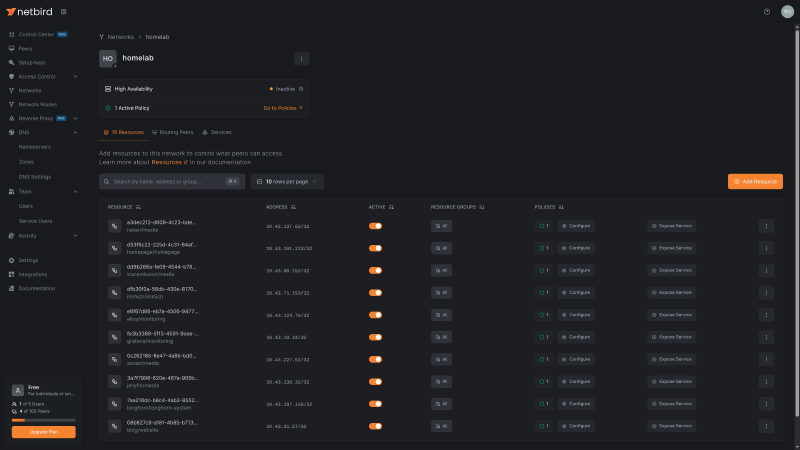
With our services deployed, we can manage the generate resources in the “homelab” network on the Netbird dashboard: